14 Analysis
Solver, time, and dimension
14.1 What this setting is
Analysis settings are the starting point for deciding which equations a case solves and how. Solver, steady or unsteady state, and 2D or 3D determine the available model and numerical-method options. They do not define fluid properties or boundary conditions; those are connected in separate settings later.
14.2 Configure in the GUI
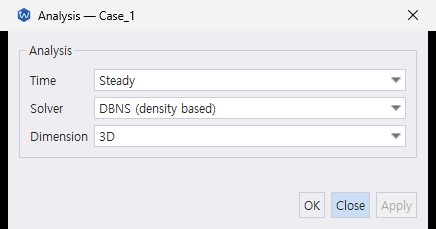
| GUI control | Input key | What to choose |
|---|---|---|
| Solver | analysis.solver |
DBNS is selectable in the Desktop. PBNS and FR are listed but disabled; configure those paths in JSONC. |
| Time | analysis.time |
Steady or unsteady analysis. |
| Dimension | analysis.dimension |
2D or 3D, matching the mesh and solver executable. |
analysis selects the case’s analysis axes. Numerical options belong in numerical_method; run-time settings belong in run_control. The first imported mesh sets the initial Dimension choice; you can change it in Analysis afterward. analysis.nondimensional is not exposed in this dialog, but remains available in JSONC.
Each key is covered in its own section below.
14.3 solver
| Value | Meaning | Conditions |
|---|---|---|
dbns |
Density-based finite-volume solver | Default; selectable in the Desktop |
pbns |
Pressure-based finite-volume solver | 3D only; JSONC configuration |
fr |
Flux-reconstruction solver | Unsteady path; JSONC configuration and an FR-enabled build |
The solver value determines the active numerical_method subblock.
dbns → numerical_method.dbns
pbns → numerical_method.pbns
fr   → numerical_method.fr
fvm and finite_volume are accepted aliases for dbns; flux_reconstruction is an alias for fr. Use canonical values in new files.
analysis.discretization is not a current input key. Express FVM or FR selection with analysis.solver.
14.4 time
| Value | Meaning |
|---|---|
steady |
Steady analysis |
unsteady |
Unsteady analysis; configure time stepping in run_control |
DBNS and PBNS support both values. FR uses the unsteady path; selecting steady with FR produces a validation warning. Set analysis.time to unsteady for FR cases and configure their time stepping in run_control.
14.5 dimension
| Value | Executable |
|---|---|
2 |
wake_2d_<tier> |
3 |
wake_3d_<tier> |
The compiled WAKE_DIM must match the input value. <tier> is the precision build (fp64, mixed, or fp32); Windows executable names add .exe. PBNS currently requires 3D.
14.6 nondimensional
| Value | Default / availability | Meaning |
|---|---|---|
true |
Default for DBNS; rejected for PBNS and FR. | Solve the DBNS equations in internally scaled variables. |
false |
Default for PBNS and FR; also accepted for DBNS. | Use dimensional solution variables. |
This is an internal solver-variable scaling choice, not a change to the physical units requested for case inputs. It is normally best to omit the key and use the solver-specific default.
14.7 JSONC examples
The GUI writes these same keys for the DBNS choices it exposes. For the CLI, or for PBNS and FR, set them in JSONC. A steady 3D DBNS selection is:
{ "analysis": { "solver": "dbns", "time": "steady", "dimension": 3 } }A 3D pressure-based selection is:
{ "analysis": { "solver": "pbns", "time": "steady", "dimension": 3 } }An unsteady FR selection is:
{ "analysis": { "solver": "fr", "time": "unsteady", "dimension": 3 } }These are analysis fragments, not complete runnable cases. PBNS and FR also need solver-appropriate models, numerical methods, and run-control settings.